Handwriting to Text: What OCR Can (and Cannot) Read
Handwriting is the hardest thing you can ask OCR to read, and it is also one of the most common requests. Lecture notes, meeting notes on a whiteboard, a recipe card from a grandmother, a field notebook, a stack of old letters — all of them exist only as handwriting, and all of them would be far more useful as text you can search, edit, and back up. The question is not whether OCR can read handwriting at all. It can. The question is how well, and what you should expect before you upload a page.
This guide gives you the honest picture: what kinds of handwriting read well, what kinds do not, how to photograph a handwritten page so it reads as well as possible, and how to proofread the result without re-reading the whole page. You can try it on the image to text converter on the home page — upload a photo of a handwritten note and look at the confidence report before you decide whether the result is usable. For the general method, see how to convert an image to text; for printed text, the JPG to text guide covers the easier case.
Why Handwriting Is Hard for OCR
Printed text is easy for OCR because it is regular. Every "a" in a printed font is identical, the letters stand apart from each other, and the lines are straight. Handwriting breaks all three of those promises at once. No two people write the same letter the same way, and the same person writes the same letter differently from one line to the next. Letters join together in cursive, so the software cannot tell where one ends and the next begins. And handwritten lines wander: they slope uphill, they crowd together, they cross the line above.
The joined-letters problem is the fundamental one. OCR works in stages — find the text, cut it into characters, recognize each character — and cursive handwriting defeats the second stage. When letters are joined, there is no clean cut point, and the software has to guess where the cuts are before it can even start recognizing. A wrong cut produces two half-letters that match nothing, and the error cascades. This is why printed handwriting, where the letters stand apart, reads far better than joined-up cursive, even when the cursive is neater to the human eye.
The second problem is variety. A printed font has one shape per letter. Handwriting has as many shapes as there are writers, and the training data for handwriting recognition is thinner than for print. The National Institute of Standards and Technology (NIST) has published handwriting databases that researchers use to train and test their systems, and the results make the gap plain: the best systems read clean printed text at 98 to 99 percent character accuracy, and the same systems read handwriting at 70 to 90 percent, depending on the writer and the style. That gap is not a flaw in one particular tool. It is the state of the technology, and any tool that promises 100 percent on handwriting is overselling.
The third problem is language. OCR corrects its own mistakes by asking whether the word it read is a real word, and whether it fits the sentence. That works well for printed prose, where the words are standard. Handwriting is full of abbreviations, proper names, numbers, and shorthand that no dictionary contains — "mtg w/ J re Q3", for example — and the language model cannot help there. It also cannot help with a word it has never seen, like a surname, which is why names are the most commonly misread words in handwritten notes.
What Reads Well, and What Does Not
It helps to sort handwriting into four kinds, because the expected accuracy is very different for each.
| Kind of handwriting | Typical accuracy | Why |
|---|---|---|
| Printed capitals and block letters | 85–95% of characters | Letters stand apart; shapes are consistent |
| Neat printed lowercase, spaced words | 80–92% of characters | Good letter separation; some ambiguous letters |
| Loose cursive, joined letters | 60–80% of characters | Segmentation fails; letters merge |
| Fast notes, abbreviations, mixed print and cursive | 50–75% of characters | Shorthand, names, and numbers defeat the language model |
Printed handwriting — the style where each letter is formed separately, the way children are taught to print — is the best case. If your notes are in this style, OCR is genuinely useful: expect a few wrong letters per line, and a proofread pass that takes minutes, not hours. Neat cursive from a careful writer is the middle case: most words will be right, but expect wrong words scattered through the text, and do not trust it for numbers or names without checking.
Fast, messy notes are the worst case, and it is worth being blunt about them: if you cannot read your own notes easily, OCR will do worse. A page of hurried meeting notes with arrows, abbreviations, words squeezed into margins, and a coffee stain is a hard page for a human, and the software has no advantage over you — it has less context, not more. For those pages, the realistic goal is a rough draft that saves you some typing, not a finished transcription.
Whiteboards deserve a special mention, because they are common and they are hard. Whiteboard markers make uneven strokes, the board glares, the writing is often large and loosely spaced, and the photograph is usually taken at an angle from across a room. Expect 70 to 85 percent accuracy on a good whiteboard photo, and photograph the board in sections if the text is small. The guide on how to improve OCR accuracy covers the photography in detail.
How to Photograph Handwriting So It Reads
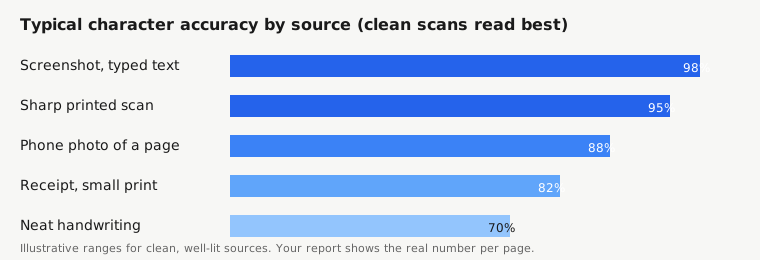
The photograph matters more for handwriting than for print, because the software has less margin for error. Four habits make the biggest difference.
First, use a dark pen on white paper, or a dark marker on a white board. Pale blue ink, pencil, and yellow highlighter over text all reduce contrast, and low contrast is the single biggest cause of failed reads. If the note is in pencil, try photographing it in bright, even light — pencil reads better in daylight than under a yellow desk lamp.
Second, photograph the page straight on, filling the frame. Perspective distortion — the page photographed at an angle so the top is narrower than the bottom — changes the shape of every letter, and handwriting has no standard shape to fall back on. Hold the phone parallel to the page. Many camera apps now detect document edges and straighten the shot; use that feature.
Third, use even light and avoid shadows. A shadow across half the page creates a line the software reads as a feature, and text inside the shadow reads worse than text outside it. Photograph near a window in daylight, or under two lights from different directions, and keep your own shadow out of the frame.
Fourth, write with OCR in mind the next time you take notes you intend to convert. This sounds like cheating, and it is — but it is the most effective tip in this guide. Print instead of joining letters. Leave space between words. Write a little larger than usual. Avoid abbreviations you will not remember later. A page written with conversion in mind reads 10 to 20 accuracy points better than the same content written in a hurry, and that is the difference between a usable result and a waste of time.
How to Convert Handwriting to Text
Upload a photo of the handwritten page to the converter on the home page. Set the language to match the writing — English by default — and choose TXT for the export, since you will be editing the result. Handwriting results always need editing, so an editable format matters more than for printed text: DOCX is a good choice if you plan to clean the text up in Word.
When the result comes back, read the confidence report before you read the text. A handwritten page typically scores 60 to 85 percent mean confidence, against 95 percent or more for printed text. That number is the honest signal of how much proofreading the page needs. If the score is above 85, a careful read-through will fix it. If it is below 70, treat the result as a draft: it will have the right words in roughly the right order, but with wrong words scattered through, and you should check it line by line against the original.
Proofread in a specific order. First, the flagged words — every word below 60 percent confidence is listed for you, and those are the words most likely to be wrong. Second, the numbers: dates, amounts, phone numbers, and quantities. OCR confuses digits more than letters, and a wrong number in a note is the error with consequences. Third, the names: people, places, and organizations. The language model cannot correct a name it does not know, so names are the most likely words to be wrong and the least likely to be flagged. Fourth, read the whole thing once, quickly, for sense. A sentence that does not make sense usually contains a misread word, and your own understanding of the subject is the best correction tool there is.
When to Use a Vision Model Re-Read
On paid plans, SnapText re-reads a page with a vision model when Tesseract returns fewer than 20 characters or under 40 percent mean confidence. Handwritten pages trigger this often, because their confidence is low, and the re-read frequently helps: vision models are better than classic OCR at handwriting, because they look at the whole word and the whole line instead of cutting characters apart first. A page that Tesseract reads at 55 percent can come back from the re-read at 80 percent, which is the difference between unusable and usable.
But the re-read has limits, and they are worth stating. It is still guessing at ambiguous letters, and it can produce a confident-sounding wrong word where Tesseract produced an obviously uncertain one. A wrong word delivered confidently is more dangerous than a wrong word flagged as uncertain, because you are less likely to check it. Treat a vision-model re-read of handwriting the same way you treat any transcription: proofread it against the original, and trust the image over the text whenever they disagree.
If you are on the free plan, you do not get the re-read, and that is a genuine limitation for handwriting. The free plan is a fair test of printed text, but for handwriting the paid re-read is often the difference between a usable result and a page of fragments. The pricing page shows the Starter plan at $9 a month, which is the cheapest way to test whether the re-read helps with your handwriting.
What About Old Letters and Historical Documents?
Old handwriting — letters from the 19th century, parish records, family papers — is the hardest case of all, and it deserves its own warning. The handwriting styles are unfamiliar to modern readers, let alone to software trained on modern writing. The ink has faded, the paper has yellowed, and the spelling is often not modern spelling, so the language model cannot correct it. Expect 40 to 70 percent accuracy on a typical 19th-century letter, and do not plan to convert an archive this way without a large proofreading effort.
That does not mean OCR is useless for historical documents. It means the goal is different: instead of a finished transcription, you get a searchable index. Even a 60-percent-accurate transcription lets you search an archive for a name or a place and find the right page, which is far better than having no text at all. The Library of Congress and the U.S. National Archives use OCR this way on their own collections: the transcription does not have to be perfect to make a million pages searchable.
If you are digitizing family papers, the practical workflow is to scan them properly first — flat, high resolution, even light — and then convert them in batches, keeping the original scans as the authoritative copy and the OCR text as a searchable companion. The scanned image is the document; the text is an aid to finding things in it.
The Short Version
Handwriting is the hardest thing OCR does, because letters join together, every writer is different, and abbreviations and names defeat the language model. Printed handwriting reads at 80 to 95 percent accuracy and is genuinely useful; loose cursive reads at 60 to 80 percent and needs a full proofread; fast, messy notes are a rough draft at best. Photograph the page straight on, in even light, with a dark pen on white paper, and write with conversion in mind next time. Proofread the flagged words first, then the numbers, then the names. And when the first pass struggles, a vision-model re-read — on paid plans — is often what turns an unusable page into a usable one.
References
- National Institute of Standards and Technology (NIST), handwriting recognition databases and research: https://www.nist.gov/
- Library of Congress, Digitization and OCR for historic collections: https://www.loc.gov/
- U.S. National Archives, Digitization programs: https://www.archives.gov/
- Tesseract OCR, official documentation: https://tesseract-ocr.github.io/
- W3C Web Accessibility Initiative, guidance on text alternatives: https://www.w3.org/WAI/